Common errors: workstation
Purpose: Match the message on the screen to its cause and fix, and look up what a bank decline code means.
When to use this: A payment failed at the counter, or a reader or service threw an error. Find the message below.
Communication & gateway errors
"Could not communicate with Payment Provider"
What it means: The till can't reach the payment service on the PC.
Fix:
- Open the Services console (
services.msc) and confirm the VitaPay service is Running. If it isn't, right-click → Start (or Restart). - Confirm the point-of-sale's payment driver is pointed at port 3036.
- Retry the payment.
If the service won't stay running, see Install & reinstall, a hostname mismatch can stop it from starting.
"Socket Error … 3006"
What it means: The payment service reached the PC, but the payment gateway (NETePay) isn't running or isn't set up.
Fix: Make sure NETePay is running on the machine, then retry. If it was closed, reopen it; if it never opened, the gateway needs to be set up (see Install & reinstall).
"Timeout waiting for PinPad"
What it means: The customer didn't act on the reader in time, or the reader was asleep.
Fix: Wake the reader and run the payment again. If the reader won't wake, see Terminal & EMV management.
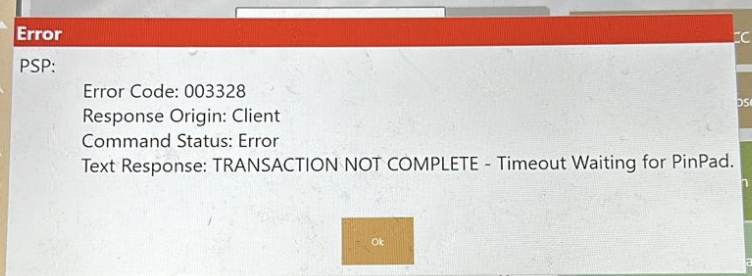 A timeout waiting for the reader, wake it and retry.
"Failed on Com Port" / NAK error
What it means: The reader has fully lost its connection to the PC. A NAK is usually the last error in a cascade, so by the time you see it, a soft reset (EMV PAD RESET) won't bring the reader back.
Fix: Physically power-cycle the reader, then restart the payment service.
- One-cable readers (for example the Verifone P400): unplug the single cable, wait a few seconds, and plug it back in.
- Externally powered readers (for example the Verifone M400): disconnect both the separate power and the USB/data cable, then reconnect both. The reader has to fully lose power, so reseating only the USB won't clear it.
Full steps are in Terminal & EMV management.
"Declined" or "parsing gateway error" while adding to a running tab
What it means: This shows up when you keep raising the authorization on an open tab through the night (common at a bar). The reader may answer with a declined error or a parsing gateway error even though the card is fine, the running authorization got into a state the gateway couldn't continue.
Fix: Stop topping up that authorization and run it again as a brand-new authorization on the same card. Treat it like a fresh tab. That clears it and lets service continue.
"Parsing gateway error" by itself means the gateway answered but the reply came back empty or garbled, often the connection dropped mid-reply. Retry once; if it keeps happening, check that NETePay is running and the network is stable, then use Upload Logs Now so support can see it.
"Reference transaction not found"
What it means: A follow-up (void, adjust, or completing a tip) can't find the original sale. Stations share their sales through the site's central server (CAPS), and each station can only see its own sales until they're shared. If this station can't reach CAPS, or the stations aren't sharing properly, a sale that started on another station looks missing.
Fix: As a quick workaround, run the action on the same station that took the original sale. To fix it for every station, get this station reconnected to CAPS (confirm the CAPS Server machine is on and the station's CAPS address is right). Full steps: Technical Triage · Reference transaction not found.
Where to look when you're stuck
- The message the point-of-sale shows on screen.
- The workstation's own logs, send them with Upload Logs Now on the dashboard.
- Event Viewer for service start-up problems (steps below).
Opening Event Viewer
- Press Windows + R, type
eventvwr.msc, and press Enter. - In the left pane, expand Custom Views and open the vitapay view if it's there. Otherwise open Windows Logs → Application.
- Sort by time and read the entries around when the problem happened. Service start-up failures and their reasons (for example a config it couldn't load) show up here.
Decline-code reference
When the bank declines a card, the reader shows a short numeric code. These come straight from the card issuer, they are not generated by us, and none here are invented. They tell you why the bank said no.
- TSYS returns the two-digit code directly, read it from the table below.
- WorldPay sometimes returns a three-digit code instead. The app translates the common ones to the same meanings: 605 → 05 (do not honor), 651 → 51 (insufficient funds), 714 → 15 (no such issuer), 756 → 54 (expired card). Everything else maps to the two-digit table below.
| Code | Meaning |
|---|---|
| 01 | Refer to issuer |
| 02 | Refer to issuer, special condition |
| 03 | Invalid merchant ID |
| 04 | Pick up card (no fraud) |
| 05 | Do not honor (bank decline, the most common) |
| 06 | General error |
| 07 | Pick up card, special condition (fraud) |
| 12 | Invalid transaction |
| 13 | Invalid amount |
| 14 | Invalid card number |
| 15 | No such issuer |
| 19 | Re-enter transaction |
| 21 | Unable to back out |
| 28 | File temporarily unavailable |
| 39 | No credit account |
| 41 | Lost card, pick up |
| 43 | Stolen card, pick up |
| 51 | Insufficient funds |
| 52 | No checking account |
| 53 | No savings account |
| 54 | Expired card |
| 55 | Incorrect PIN |
| 57 | Transaction not permitted, card |
| 58 | Transaction not permitted, terminal |
| 61 | Exceeds withdrawal limit |
| 62 | Invalid service code, restricted |
| 63 | Security violation |
| 65 | Activity limit exceeded |
| 75 | PIN tries exceeded |
| 79 | Already reversed at switch |
| 80 | Invalid date |
| 81 | Cryptographic error |
| 83 | Cannot verify PIN |
| 93 | Violation, cannot complete |
| 94 | Unable to locate, no match |
| 96 | System malfunction |
What to do with the common ones is on the manager quick reference. In short: 05, 51, and 54 mean try another card; 55 means re-enter the PIN; 14 means re-key the number.
Virtual-wallet increment codes
These three are not issuer declines. They show up specifically when you increment a virtual-wallet (tapped mobile wallet) authorization, and the card brand decides the number:
| Code | On-screen message | Card brand |
|---|---|---|
| 662 | PSP: TRANS DENIED | Mastercard |
| 783 | PSP: AUTH DECLINED | Discover |
| 702 | PSP: DECLINED | Amex |
The fix is the same for all three: use a tapped wallet only for final sales, and have the customer insert a physical card for anything that will increment (a bar tab, a preauth you'll top up). Full explanation: Error codes · Declines when incrementing a virtual wallet.