Common errors: handheld
Purpose: Match what you see on the handheld to its cause and fix, and look up what a bank decline code means.
When to use this: A payment failed on a handheld, or the app or reader threw an error.
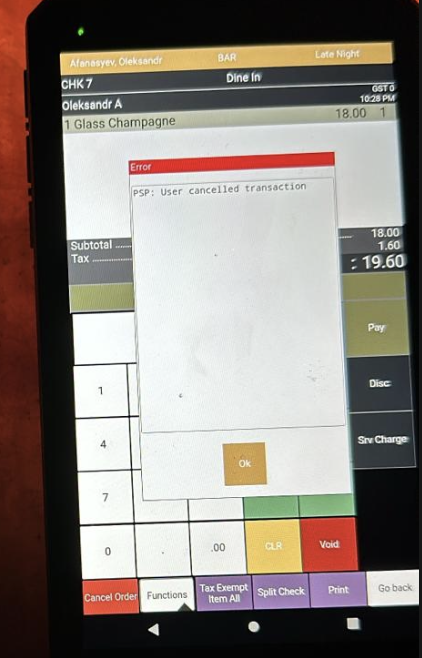
"PSP: User cancelled"
What it means: The device went to sleep mid-payment, so the payment was cancelled.
Fix:
- Press the Home button to wake the device.
- If it's locked, enter the device unlock PIN, 3525, unless your site changed it.
- Retry the payment.
App won't respond, or "Could not communicate with Payment Provider"
What it means: The payment app isn't running or lost its connection.
Fix: Reopen the app by tapping the Vitabyte tile, or tap Back To POS and back in. If it persists, swipe away all open apps and relaunch.
 Relaunch the app from the Vitabyte tile if it stops responding.
Payments cancel on their own
What it means: Usually the device is low on battery or in a power-saving mode that suspends the app.
Fix:
- Charge the device and turn off battery saver / low-power mode.
- Confirm the Merchant ID is set and the device's deployment was activated.
- Retry.
Payments are slow
What it means: Weak or dropping Wi-Fi.
Fix: Move closer to the access point, or get the device onto a stronger network. Slow approvals are almost always the network.
"Suspected Fraud" while testing
What it means: A test card tripped the issuer's fraud check (code 59).
Fix: Use a debit card for test transactions instead of the card that's being flagged.
Card times out / "Remove Card"
See Reader & EMV management, retry, and on a VP3300/VP3350 tap the card on the back of the device.
Decline-code reference
When the bank declines a card, the app shows a short code. These come straight from the card issuer as the app reads the response, none are invented.
The device shows which processor it's using (TSYS or WORLDPAY) in Device Settings.
- TSYS returns the two-digit code directly.
- WorldPay sometimes returns a three-digit code, which the app maps to the same meaning: 605 → 05 (do not honor), 651 → 51 (insufficient funds), 714 → 15 (no such issuer), 756 → 54 (expired card).
| Code | Meaning |
|---|---|
| 01 | Refer to issuer |
| 02 | Refer to issuer, special condition |
| 03 | Invalid merchant ID |
| 04 | Pick up card (no fraud) |
| 05 | Do not honor (bank decline, the most common) |
| 06 | General error |
| 07 | Pick up card, special condition (fraud) |
| 12 | Invalid transaction |
| 13 | Invalid amount |
| 14 | Invalid card number |
| 15 | No such issuer |
| 19 | Re-enter transaction |
| 21 | Unable to back out |
| 28 | File temporarily unavailable |
| 39 | No credit account |
| 41 | Lost card, pick up |
| 43 | Stolen card, pick up |
| 51 | Insufficient funds |
| 52 | No checking account |
| 53 | No savings account |
| 54 | Expired card |
| 55 | Incorrect PIN |
| 57 | Transaction not permitted, card |
| 58 | Transaction not permitted, terminal |
| 61 | Exceeds withdrawal limit |
| 62 | Invalid service code, restricted |
| 63 | Security violation |
| 65 | Activity limit exceeded |
| 75 | PIN tries exceeded |
| 79 | Already reversed at switch |
| 80 | Invalid date |
| 81 | Cryptographic error |
| 83 | Cannot verify PIN |
| 93 | Violation, cannot complete |
| 94 | Unable to locate, no match |
| 96 | System malfunction |
The everyday short version is on the manager quick reference.
Virtual-wallet increment codes
These three are not issuer declines. They show up specifically when you increment a virtual-wallet (tapped mobile wallet) authorization, and the card brand decides the number:
| Code | On-screen message | Card brand |
|---|---|---|
| 662 | PSP: TRANS DENIED | Mastercard |
| 783 | PSP: AUTH DECLINED | Discover |
| 702 | PSP: DECLINED | Amex |
The fix is the same for all three: use a tapped wallet only for final sales, and have the customer insert a physical card for anything that will increment (a bar tab, a preauth you'll top up). Full explanation: Error codes · Declines when incrementing a virtual wallet.